Sync your meeting minutes with Salesforce
- Boost the use of your CRM!
- Automatic note-taking by AI
- Send insights directly to Salesforce
Overview: Leexi + Salesforce Integration
The integration allows you to import call notes directly into the CRM, within a contact, organization, or deal record. Taking notes during a call, creating a report, then entering it into your CRM? That's a thing of the past! Your assistant handles everything: it transcribes your calls, summarizes them, and more! You save valuable time by automating the tedious task of CRM data entry.
How to integrate Salesforce and Leexi?
Prerequisites:
Administrator rights on your Leexi and Salesforce accounts.
Step 1:
On your Salesforce account
Before activating the Leexi integration, we recommend enabling Shared Activities on your Salesforce account. When a meeting involves multiple clients, this allows us to create a single note linked to each client.
Step 2:
On your Leexi account
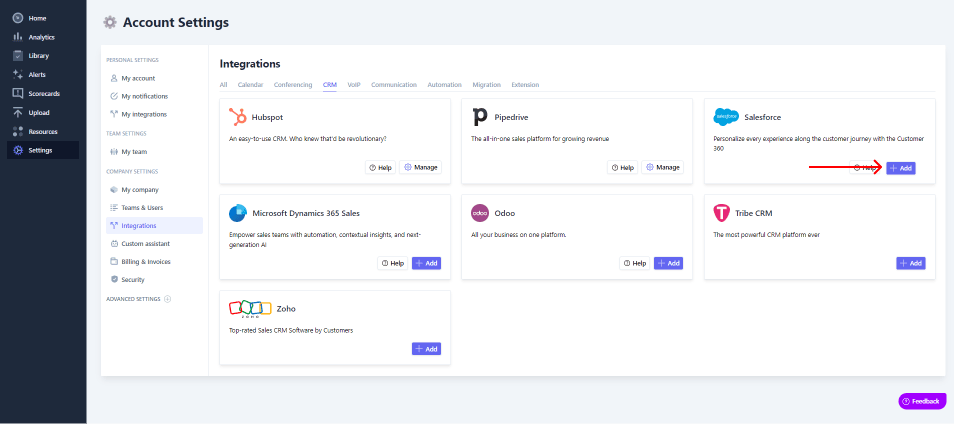
Go to Settings → Integrations (admin access only)
Click Add for the Salesforce integration
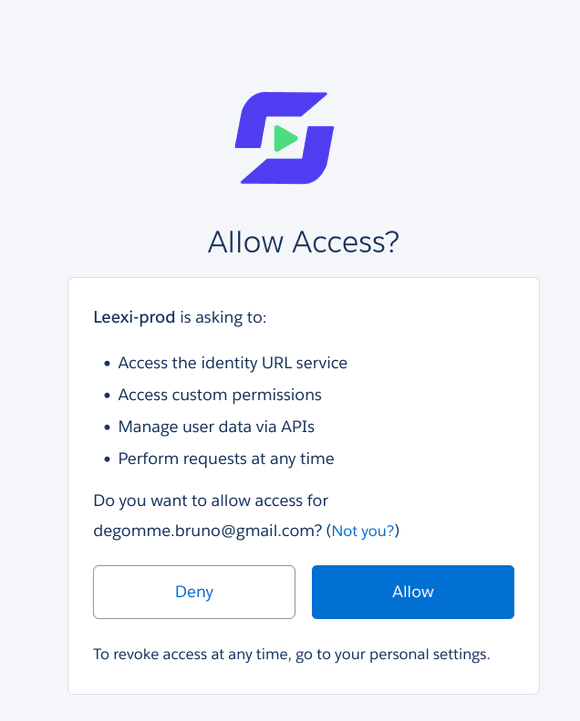
Accept the requested permissions
Benefits of the integration
By integrating Salesforce with Leexi, you:
- Save time by letting Leexi automatically fill your CRM.
- Boost your efficiency by consolidating your information in one place.
- Free up time to deliver a better customer experience.
- Shorten sales cycle times.
Ready to boost your productivity with Leexi?
Leexi AI Notetaker takes notes for you