Automatic digest of your Microsoft Teams meetings
- Boost the productivity of your meetings!
- Automatic recording of video conferences
- Full transcripts, customized summaries and more

Simplify your meetings with our integration of Teams with Leexi. The assistant can join your meetings automatically and record them.
Overview: Leexi + Microsoft Teams Integration
The integration allows the Leexi assistant to record your Microsoft Teams meetings by joining the call. From this recording, Leexi provides you with a complete transcription of your meeting, a summary, a list of follow-up tasks, advanced statistics, and other exciting features! And the best part? It's all automatic! By connecting Leexi to your Outlook calendar, your assistant accesses and automatically joins your meetings to take notes for you.
How to Integrate Microsoft Teams and Leexi?
Step 1:
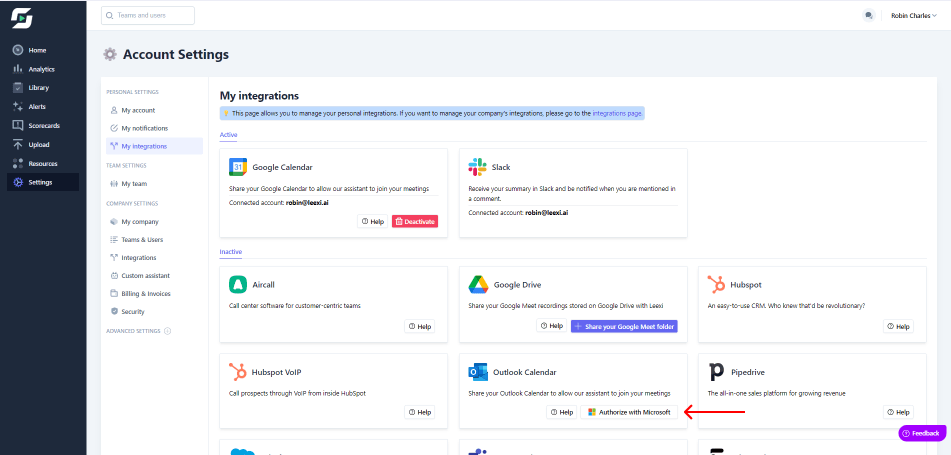
In your Leexi app, go to settings.
Step 2:
Click on My Integrations.
Step 3:
Click on Authorize with Microsoft in the Outlook Calendar section.
Benefits of the Integration
By integrating Microsoft Teams with Leexi:
- Your meetings are recorded automatically.
- Manage your Leexi assistant more easily.
- Enjoy meetings without the need to take notes.
- Save time writing up your minutes.
Ready to boost your productivity with Leexi?
Leexi AI Notetaker takes notes for you